





Beyond the Trash: A Smarter Way to Uninstall Apps on macOS
For most Mac users, removing software feels like a simple task: drag the icon to the Trash and empty it. However, this standard method is deceptive. macOS applications are notorious for scattering “digital debris”-such as hidden cache files, preference lists, support logs, and container data-across your system folders. Over time, these orphaned files accumulate, potentially consuming gigabytes of storage and cluttering your Library directory. According to recent storage management studies, users can often reclaim 5% to 10% of their total disk space simply by purging these hidden remnants left behind by uninstalled software.
The Evolution of Mac Cleanup Tools
While long-standing utilities like AppCleaner have served the community faithfully for years, the landscape of system maintenance is shifting toward more integrated, open-source solutions. A standout newcomer in this space is Uninstally by Codenta. Designed to address the same persistent issue of leftover data, it offers a more modern, streamlined approach to keeping your macOS environment pristine.
Seamless Integration with Finder
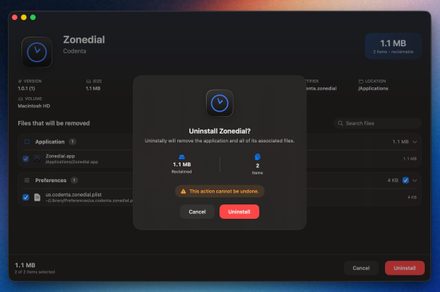
What sets Uninstally apart is its deep integration with the macOS user experience. Rather than forcing you to launch a separate utility every time you want to remove a program, it functions as a Finder extension. Once enabled, you simply right-click any application bundle and select “Uninstall with Uninstally” from the context menu. This triggers a clean, intuitive confirmation window, bypassing the need to navigate through a secondary app browser.
Precision Scanning Technology
The effectiveness of an uninstaller lies in its detection engine. Uninstally moves beyond simple keyword matching-which can often lead to false positives-by utilizing the application’s unique bundle identifier and specific helper namespaces. This allows the tool to accurately map out related files across the complex Library hierarchy. Before any data is permanently deleted, the software provides a transparent summary, including the app’s icon, the total amount of storage to be reclaimed, and a detailed list of files that you can manually review or deselect.
Advanced Features for Power Users
Beyond its quick-action capabilities, Uninstally offers a robust standalone interface for comprehensive system audits. This dashboard allows you to:
- Filter and Sort: Organize your software by size, installation date, or usage frequency.
- Identify Issues: Quickly spot broken installations, duplicate apps, or software that has been sitting idle for months.
- Orphaned File Scanner: This is perhaps its most powerful feature. It scans your system for files belonging to apps you have already deleted, effectively cleaning up the “ghost” data that manual removal leaves behind.
Support for Homebrew and Beyond
For developers and power users who rely on the command line, Uninstally provides excellent support for Homebrew casks and formulae. It visualizes complex dependency relationships and offers a “zap” cleanup feature to ensure that even terminal-installed packages are scrubbed clean. While standard user-domain files are sent directly to the Trash for safety, any system-level items requiring elevated permissions will trigger a secure administrator prompt.
If you are looking to optimize your Mac’s performance and reclaim lost storage, you can explore the project further via Codenta’s official website or contribute to its development on their GitHub repository.