


Personalizing Your Explosives: A Guide to C4 Sticker Customization in CS2
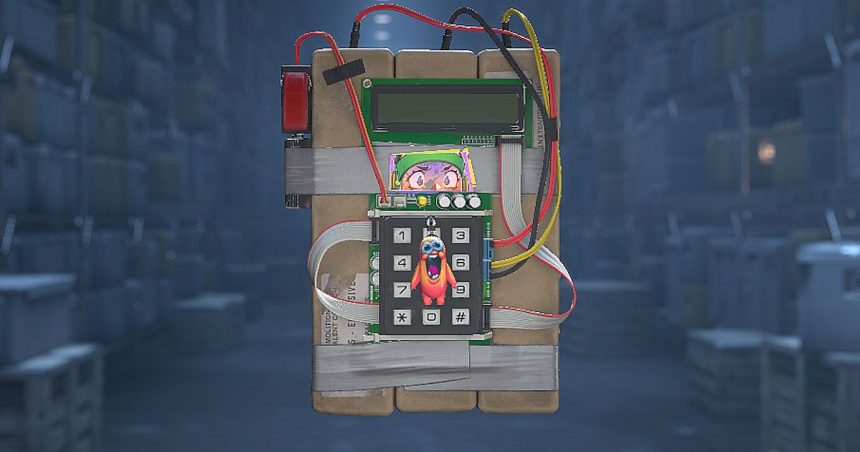
Valve has officially expanded the cosmetic horizons of Counter-Strike 2, granting players the ability to adorn their C4 explosives with stickers. Rolled out as part of the significant September 22, 2026, update, this feature brings the bomb in line with standard weapon customization, offering users the same granular control over placement and rotation that they have enjoyed with firearm skins for years.
The “Rush Hour” Update and Beyond
This aesthetic enhancement was a highlight of the comprehensive “Rush Hour” patch. Beyond mere visual flair, this update was a major milestone for the game’s ecosystem, marking the debut of the highly anticipated Rush game mode. Furthermore, the patch addressed long-standing community requests by refining the Premier map selection process and reintroducing the tactical depth of silent reloads.
According to recent player engagement data, cosmetic customization remains a primary driver for market activity within the Steam ecosystem, with sticker application rates spiking by nearly 15% following the introduction of new, non-weapon surfaces like the C4.
How to Customize Your C4
If you are looking to leave a personal mark on the bomb, the process is straightforward, provided you have the necessary items in your digital collection. To begin, ensure you have at least one unused sticker available in your inventory.
- Access Your Loadout: Navigate to your Counter-Strike 2 inventory screen.
- Locate the Explosive: Find the C4 unit within your inventory list.
- Apply and Adjust: Select the sticker you wish to use and apply it to the C4. You will be prompted with an interface similar to the weapon sticker menu, allowing you to drag, rotate, and scale the sticker to your preferred position on the device.
For those interested in the full technical breakdown of the patch or looking to see how these changes impact the broader meta, you can find the complete details in the official patch notes. For more insights into the evolving landscape of Counter-Strike 2, stay tuned to the latest community updates.