




Stevie Bonifield is a dedicated tech journalist specializing in consumer electronics. With a background rooted in hardware analysis, gaming trends, and artificial intelligence at Laptop Mag, she brings a sharp perspective to the evolving landscape of digital communication.
WhatsApp Finally Bridges the Gap with Message Scheduling
For its massive global base of 3 billion active users, WhatsApp is finally rolling out a highly anticipated update: the ability to schedule messages. While competitors like Telegram and Slack have offered time-delayed messaging for years, Meta is now integrating this functionality into both individual threads and group conversations, marking a significant shift in how users manage their digital correspondence.
Why Timing Matters in Digital Communication
The utility of this feature extends far beyond simple convenience. Whether you are coordinating across different time zones, ensuring a professional message arrives during business hours, or simply wanting to send a birthday greeting without waking up at dawn, the scheduling tool provides a necessary buffer. According to recent industry data, asynchronous communication tools are becoming increasingly vital as remote work and global connectivity continue to rise, with productivity apps seeing a 20% increase in usage for automated scheduling features over the last year.
How to Automate Your Chats
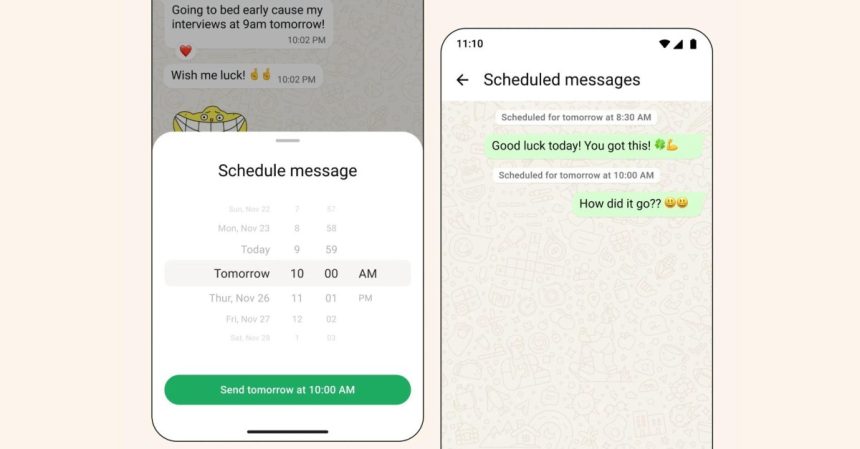
Meta has designed the interface to be intuitive and seamless. To queue a message, simply follow these steps:
- Draft your text, photo, or video content as you normally would.
- Instead of a quick tap, press and hold the “send” icon.
- Select your preferred date and time from the prompt.
- Confirm your selection.
Once scheduled, the message remains in a pending state. Users can easily navigate to their “Scheduled” dashboard to review, edit, or cancel any upcoming posts before they are delivered. The recipient will see the message appear exactly as a standard text, with no indication that it was pre-written.
Reliability and Performance
One of the most impressive aspects of this rollout is its reliability. Unlike third-party automation tools that often require your device to remain active and connected to the internet, Meta’s native implementation handles the scheduling server-side. This means your message will be delivered precisely on time, even if your smartphone is powered down, in airplane mode, or completely out of battery.