





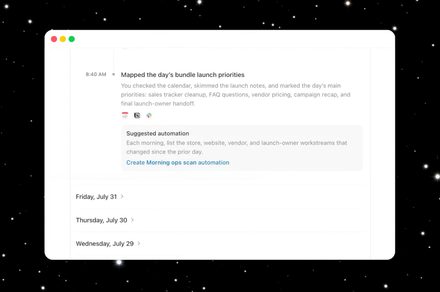
Security Concerns Emerge Over ChatGPT’s Mac “Computer History” Feature
The integration of AI into our daily workflows has taken a significant step forward with the introduction of ChatGPT’s Computer History for macOS. By tracking user interactions-such as keystrokes, mouse clicks, and application transitions-the tool aims to provide a more intuitive, context-aware AI assistant. However, a closer look at OpenAI’s official documentation reveals a potential security oversight: the data logs generated by this feature are stored without encryption.
The Vulnerability of Plain-Text Logs
While the convenience of having an AI that “remembers” your workflow is undeniable, the technical implementation raises eyebrows. According to OpenAI, the system functions by temporarily logging interaction events locally on your Mac. These files are purged every 48 hours, but in the interim, they are converted into plain-text Markdown files.
The core issue is that these files lack any form of encryption. Because they reside on your local machine in an unencrypted state, any other application or malicious script running under your user profile could theoretically scrape this data. In an era where cybersecurity threats are evolving-with recent reports indicating that AI agents are increasingly being tested for vulnerabilities-leaving sensitive behavioral data in plain text is a risky design choice.
Comparing the Scope: ChatGPT vs. Microsoft Recall
This functionality draws immediate parallels to Microsoft’s Recall feature for Windows. While ChatGPT’s approach is arguably less intrusive because it avoids taking constant screenshots or recording audio and video, the privacy implications remain substantial.
By logging your digital footprint, the feature creates a detailed map of your habits:
* Application Usage: Which software you open and when.
* Web Browsing: The specific sites you visit and interact with.
* Document Engagement: Which files you open and the nature of your interactions with them.
Even without visual snapshots, this metadata provides a comprehensive profile of a user’s activity. For context, cybersecurity experts often warn that metadata can be just as revealing as raw content; for instance, knowing when and how long a user spends in a banking app or a private messaging tool can be enough to infer sensitive information.
A Balancing Act for Privacy-Conscious Users
As AI continues to permeate our operating systems, the tension between “smart” features and data security will only intensify. While the 48-hour deletion window is a safeguard, the lack of encryption means that for those two days, your digital activity is essentially an open book to any process with sufficient permissions on your Mac. Users should weigh the productivity benefits of a context-aware AI against the potential exposure of their local interaction history.

![[Event Review] Fall’s CRSSD Festival Filled Waterfront Park with Energy and Joy](https://www.mixtv1.com/wp-content/uploads/2026/10/38194-attachment.jpg)