




Streamlining Your Workflow: Meta Virtual Display Expands Mac Capabilities
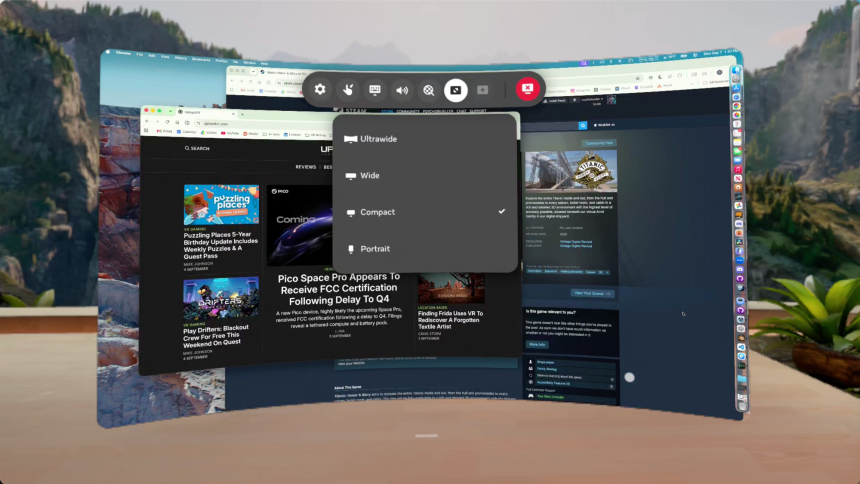
Meta continues to refine the Virtual Display experience for Quest headsets, bridging the feature gap between operating systems. The latest updates bring long-awaited parity to macOS users, ensuring that the advanced functionality previously reserved for Windows environments is now fully accessible on Apple hardware.
Intuitive Connectivity: The “Look-to-Connect” Feature
One of the most significant enhancements is the introduction of a seamless connection workflow. Previously, initiating a remote session required users to manually launch the Meta Quest app and navigate through menus to select their computer.
Now, the process is far more fluid. When wearing your headset, simply glancing at your MacBook triggers a floating interface element. A “Connect to view in headset” button appears directly over your physical laptop in passthrough mode. This spatial awareness allows you to jump into your virtual workspace instantly, removing the friction of software-based device selection.
Achieving Feature Parity Across Platforms
This “look-to-connect” functionality was initially rolled out for Windows 11 users in late 2024, as highlighted in this report on seamless remote desktop integration. By leveraging the headset’s internal sensors to recognize your physical environment, Meta has successfully replicated this high-end experience for Mac users.
Beyond simple connectivity, Meta has been aggressively iterating on the Virtual Display ecosystem. Recent updates have focused on:
* Input Forwarding: Enhancing the responsiveness of your physical keyboard and mouse within the virtual environment.
* Latency Reduction: Optimizing the data stream to ensure that high-resolution displays remain crisp and lag-free, which is critical for professional productivity.
* Cross-Platform Consistency: Ensuring that whether you are tethered to a PC or a Mac, the interface remains intuitive and reliable.
Why This Matters for Productivity
As remote work and spatial computing continue to evolve, the ability to turn any physical desk into a multi-monitor workstation is becoming a standard requirement rather than a novelty. With the latest Quest firmware, the barrier to entry for Mac-based professionals has been significantly lowered. By integrating the computer’s physical presence into the virtual UI, Meta is moving closer to a truly “mixed reality” office where the transition between physical and digital tools is virtually invisible.