




Unlock Your Mac’s Hidden USB-C Diagnostic Power with WhatCable
For years, the tech community has struggled with the “USB-C mystery.” You likely own a drawer full of identical-looking cables, yet you have no way of knowing which ones are capable of high-speed data transfers, which support 100W+ power delivery, and which are merely basic charging cords. While inexpensive hardware testers once offered a glimpse into these capabilities, many have been discontinued or lack the precision needed for modern standards.
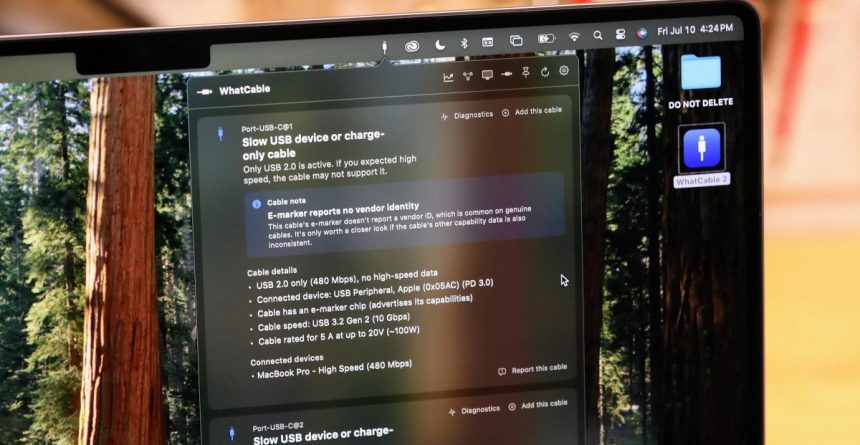
If you are using a Mac equipped with Apple Silicon, you no longer need external hardware to solve this puzzle. A powerful, free utility called WhatCable has emerged as the definitive tool for auditing your USB-C ecosystem. By tapping into data your Mac already collects but hides from the standard user interface, this menu-bar app provides a transparent look at your hardware’s true performance.
How WhatCable Uncovers Hidden Data
The brilliance of WhatCable lies in its simplicity. It doesn’t rely on invasive root access or private system hacks. Instead, it acts as a translator for the information your Mac’s port controller chip is already processing.
According to the app’s creator, Darryl Morley, every Apple Silicon Mac performs a “Discover Identity” handshake whenever a cable with an e-marker (electronic marker) is connected. This process exchanges vital specifications, including:
- Vendor ID: Who actually manufactured the cable.
- Speed Ratings: Whether the cable is limited to USB 2.0 speeds or supports high-bandwidth Thunderbolt/USB4.
- Power Limits: The specific voltage and current thresholds the cable is rated to handle.
- Architecture: Whether the cable is active or passive.
While macOS stores this data in the IOKit registry, it isn’t surfaced in the System Information menu. WhatCable simply pulls this existing data into a clean, readable interface, allowing you to see exactly what your hardware is negotiating in real-time.
Beyond the Specs: Identifying Bottlenecks
What makes this tool superior to basic hardware testers is its ability to correlate three distinct data points
The Hidden Truth Behind Your USB-C Cables: Why Specs Often Lie
We’ve all been there: you grab a random USB-C cable from your drawer, expecting it to handle high-speed data transfers or rapid charging, only to be met with sluggish performance or a “slow charging” notification. The reality is that the USB-C connector is merely a physical shape, not a guarantee of performance. To truly understand what your hardware is capable of, you need to look past the branding and test the internal “e-marker” chip.
When Premium Cables Fail: The Case of the Supercalla
The USB-C Cable Chaos: Why Your Mac Can’t Always Trust What It Sees
Navigating the world of USB-C cables is notoriously frustrating. Despite the universal connector shape, the internal capabilities vary wildly, leading to a market flooded with misleading marketing and hardware that fails to live up to its advertised specs. Recent testing reveals that even when your computer reports a specific speed, the reality can be vastly different.
When Marketing Claims Fail Reality
Take, for instance, a cable marketed as a 10 Gbps USB 3.2 Gen 2 solution. In practice, it failed miserably. Instead of the rapid data transfers expected, moving a 25GB file took agonizing minutes rather than seconds. While the cable successfully handled 5-amp charging, its data performance was non-existent. A simple $8 hardware tester immediately exposed the truth: the cable lacked the necessary “SuperSpeed” (SS) wiring required for USB 3.0+ data rates, proving that the internal e-marker chip was essentially lying about the cable’s true potential.
The Mystery of Misreported Data
The confusion doesn’t stop at underperforming cables; sometimes, the software reports data that defies logic. When testing a magnetic accordion-style USB-A to USB-C cable-a design strictly limited to USB 2.0 (480 Mbps


It appears that the content provided in your prompt was incomplete, consisting only of a footer element and author metadata rather than the body of an article.
Please provide the full text of the article you would like me to rewrite.
Once you provide the source text, I will immediately apply the requested transformations-restructuring the narrative, integrating current data, and refining the tone-to deliver a high-quality, unique piece ready for publication.