



ChatGPT Evolves: New Browser Integration Bridges the Gap Between AI and Your Workflow
OpenAI is fundamentally changing how we interact with the web by transforming ChatGPT from a standalone chatbot into a context-aware digital assistant. By enhancing its desktop application and Chrome extension, the company is enabling the AI to “see” and process your active browser environment, effectively turning your open tabs and current screen content into a conversational workspace.
This strategic pivot follows OpenAI’s decision to discontinue its experimental “Atlas” browser project. By abandoning a proprietary browser in favor of integrating directly into the tools users already rely on, OpenAI is prioritizing accessibility and seamless workflow integration over building a walled garden.
Context-Aware Browsing: How It Works
The latest updates allow ChatGPT to act as a bridge between your browser and your queries. Instead of manually copying and pasting information, you can now leverage the AI’s ability to ingest live data from your active session.
Key Features of the Enhanced Chrome Extension
* Tab Awareness: You no longer need to summarize your research. By referencing your open tabs, ChatGPT can synthesize information across multiple pages, helping you connect dots between different sources without leaving your current window.
* Precision Highlighting: If you are reading a dense article or a complex technical document, you can simply highlight a specific paragraph and prompt the AI to explain, summarize, or critique that exact section. This eliminates the need for tedious manual descriptions.
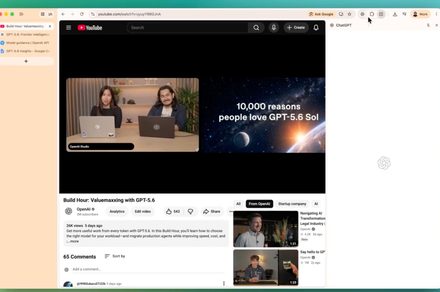
* Video Intelligence: The integration extends to multimedia, allowing you to ask questions about YouTube videos directly. Whether you need a quick summary of a long-form lecture or a specific answer buried in a tutorial, the AI can now parse the content for you.
A Shift Toward Integrated Productivity
Recent industry data suggests that the average knowledge worker spends nearly 30% of their day switching between applications and searching for information. By embedding these capabilities directly into the browser, OpenAI is addressing the “context switching” fatigue that plagues modern digital work.
For instance, imagine you are planning a trip. Previously, you might have had to copy flight details, hotel reviews, and itinerary notes into a prompt. Now, with the updated extension, you can simply keep those tabs open and ask ChatGPT to “create a daily schedule based on the hotel and flight tabs I have open.”
Desktop App Enhancements
Beyond the browser, the ChatGPT desktop application is receiving a boost in utility. As you type, the app now provides intelligent URL suggestions, making it easier to navigate back to relevant resources or jump between your AI workspace and your web research. This creates a more fluid experience, ensuring that the AI feels like a native component of your operating system rather than a separate, disconnected tool.
As OpenAI continues to refine these features, the goal is clear: to make the AI an invisible layer of intelligence that sits on top of your existing digital habits, rather than forcing you to adapt your habits to the AI.