



When you purchase through links in our articles, we may earn a small commission. This doesn’t affect our editorial independence.
Optimizing the Windows 11 Context Menu: A Performance-Driven Redesign
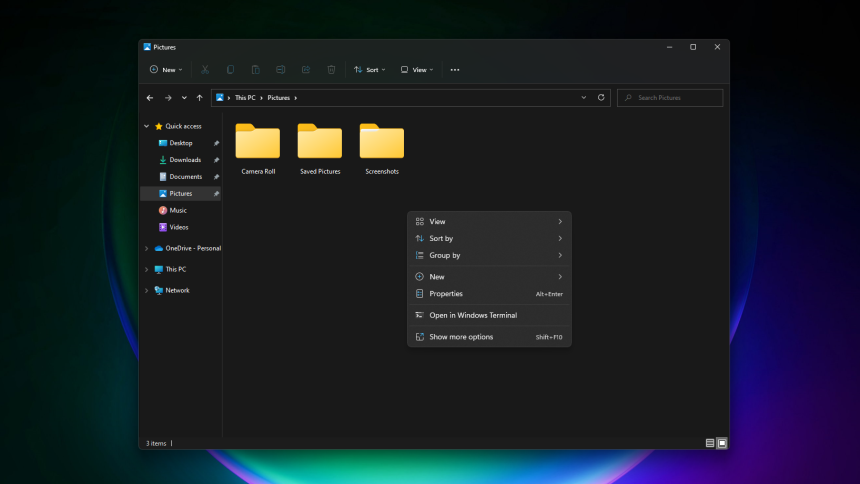
Microsoft is actively addressing one of the most common user complaints regarding Windows 11: the sluggish performance of the right-click context menu. Recent insights indicate that the software giant is engineering a more streamlined, high-speed interface designed to prioritize efficiency and user-specific workflows.
Streamlining the User Experience
The current iteration of the Windows 11 context menu has often been criticized for its latency, particularly when third-party applications inject numerous, rarely used commands into the list. To combat this, the upcoming update focuses on a “less is more” philosophy. By minimizing visual clutter and prioritizing essential functions, Microsoft aims to shave off the milliseconds of delay that currently frustrate power users.
Key Features of the Upcoming Interface
The overhaul is not merely about speed; it is about personalization. The new design is expected to introduce several functional improvements:
- Enhanced Customization: Users will gain the ability to toggle specific actions on or off, allowing for a tailored menu that only displays the tools they actually utilize.
- Reordering Capabilities: Beyond simple hiding, the update will likely allow for the manual reordering of menu items, ensuring that your most frequent tasks are always at the top of the list.
- Third-Party Management: The update aims to better sandbox third-party app integrations, preventing external software from bloating the menu and degrading system responsiveness.
A Broader Commitment to System Fluidity
This initiative is a significant component of Microsoft’s ongoing mission to refine the Windows 11 user interface. As the operating system continues to evolve, the focus has shifted from purely aesthetic changes to deep-level performance optimizations. By reducing the overhead required to render the context menu, Microsoft is effectively lowering the “input lag” that users experience during daily file management tasks. This aligns with recent telemetry data suggesting that UI responsiveness is a primary driver of user satisfaction in modern desktop environments.