



Unlocking the Full Potential of Pixel 11’s HiLight System
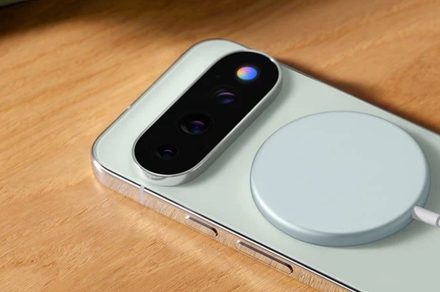
The Pixel 11 series introduced a visually striking feature that immediately caught the attention of tech enthusiasts: the “HiLight” LED notification array. While the hardware is undeniably impressive, Google’s initial implementation felt restrictive. Out of the box, this vibrant lighting system was relegated to a handful of specific tasks, such as signaling Gemini interactions or identifying incoming callers.
For many power users, this felt like a significant oversight. The hardware possessed the capability to be a versatile notification hub, yet it remained tethered to a limited set of Google-sanctioned functions.
Bridging the Gap: The HiLight Studio Solution
The frustration surrounding these limitations has finally been addressed, not by Google, but by the developer community. Tech creator Dhananjay Bhosale (@Dhananjay_Tech) has engineered a third-party solution that effectively “jailbreaks” the HiLight system, transforming it from a static indicator into a fully customizable notification engine.
His new application, HiLight Studio, provides the granular control that users originally expected from the Pixel 11 Pro. By bypassing the manufacturer’s software locks, the app empowers owners to take full command of the device’s rear-facing LED array.
Key Features of the Custom HiLight Experience
With HiLight Studio, the customization possibilities expand significantly. Instead of being limited to system-level alerts, users can now tailor the hardware to their specific workflow. Notable features include:
* Per-App Customization: Assign unique lighting patterns and colors to specific applications. For instance, you can set a distinct pulse for urgent work emails while keeping social media notifications subtle.
* Advanced Animation Control: The app allows users to manipulate all eight integrated LEDs, enabling complex light sequences rather than simple, static glows.
* Expanded Color Palette: Users can choose from five distinct color profiles to match their personal aesthetic or notification priority.
* Configuration Portability: The app includes import and export functionality, allowing users to back up their lighting configurations or share their custom setups with the broader Pixel community.
Why This Matters for Pixel Users
Customization has long been a cornerstone of the Android experience. According to recent industry data, over 65% of flagship smartphone users prioritize the ability to personalize their device’s interface and notification behavior. By restricting HiLight, Google inadvertently stifled the very creativity that defines the Pixel brand.
Think of it like buying a high-performance sports car that is electronically limited to 30 mph; the potential is there, but it remains inaccessible. HiLight Studio acts as the performance chip that removes those artificial barriers, allowing the hardware to function at its intended capacity. Whether you want to know who is messaging you without glancing at your screen or simply want to add a touch of flair to your device, this utility turns a missed opportunity into a standout feature.