





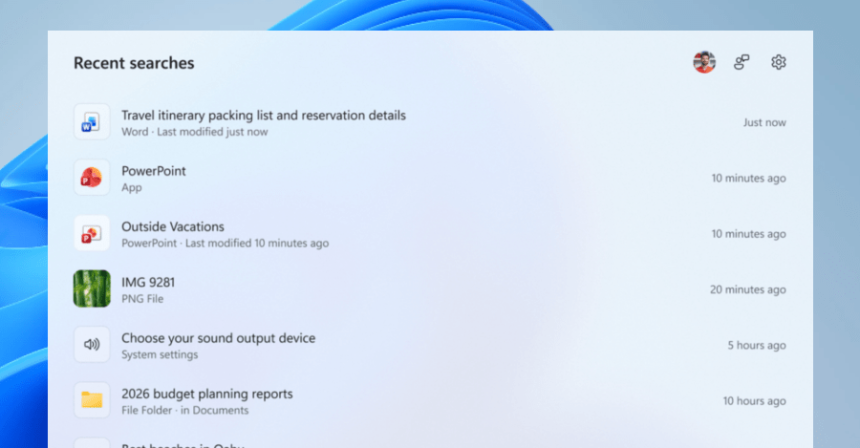
Windows 11 Search Gets a Minimalist Makeover: Microsoft Prioritizes User Experience
Microsoft is taking a significant step toward streamlining the Windows 11 interface by testing a stripped-back version of its search menu. By removing intrusive advertisements and cluttered recommendation tiles, the company aims to refocus the search experience on utility rather than promotion. This initiative, currently rolling out to Windows Insiders in the Experimental channel, is part of a broader corporate strategy to rebuild user trust and refine the overall Windows ecosystem.
A Focused Interface: Removing the Noise
The most immediate change users will notice is the transformation of the search homescreen. Historically, opening the search menu meant navigating through a barrage of distracting elements, such as “image of the day” features, trending search queries, daily quizzes, and unsolicited game suggestions. The new design eliminates this clutter, presenting a clean, minimalist interface that highlights only your recent search history.
This shift mirrors a growing trend in software design where “less is more.” By removing non-essential content, Microsoft is effectively reducing the cognitive load on users, allowing them to find what they need without being bombarded by marketing noise.
Prioritizing Local Content and Accuracy
Beyond the visual cleanup, the underlying search logic is receiving a major overhaul. Microsoft is shifting its algorithm to prioritize local data-such as your personal files, installed applications, and system settings-over web-based results and Microsoft Store promotions. This change ensures that when you search for a document or a specific app, the system delivers the most relevant local result first.
Furthermore, the search menu will now provide more transparent metadata and file previews in the right-hand pane. This allows users to quickly verify the source of a file before opening it. For those who prefer a completely ad-free experience, Microsoft has introduced a new toggle in the Settings menu that allows users to disable web and Store recommendations entirely.
Enhanced Search Intelligence and Performance
The update isn’t just about aesthetics; it’s also about smarter functionality. Microsoft has improved the search engine’s ability to interpret user intent, even when queries are imperfect. The system is now significantly more adept at handling:
- Typographical errors: Correcting common misspellings on the fly.
- Partial queries: Providing accurate results even when only a fragment of a word is typed.
- Extra characters: Ignoring accidental keystrokes that previously derailed search results.
These quality-of-life improvements, combined with under-the-hood performance optimizations, make the search function feel snappier and more reliable. As Microsoft continues to iterate on these features, the goal remains clear: creating a Windows 11 environment that feels less like a billboard and more like a productive workspace.
For more updates on the latest Windows 11 features and tech news, read more here.